For example, I want to create a game with 3D contents run on browsers, and I want the content to scale fit for both the width and height, but when I creates a 3D helloworld sample project and also tick both ‘fit width’ and ‘fit height’, the game screen seems just scale fit the height only, but not the width, is it the restriction of the game engine or I need to set something to let the 3D content fit both width and height?
To explain clearer, what I try to do currently: create a helloworld 3D project, then tick both ‘fit width’ and ‘fit height’:
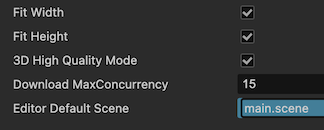
Then build the game with ‘web-moble’ and run on browsers, when I adjust the height of the window so that the window is shorter than the designed height, the 3D content scales down normally:
but when I try to adjust the width, the 3D content didn’t change the scale, but seems adjust the visible area only:
I want the 3D content to scale fit the current window size automatically instead of changing the size of visible area, both for the width and height (ie:when either window height is smaller than designed height or window width is smaller than designed width, the content would be scaled down at both cases), is there any ways to achieve this effect with Cocos Creator?
Note: I want both width and height of the 3D content to scale fit automatically according to the window size, at first I use version 2.4.5 and found it scale fits on height only, hence I try version 3.8.8 and the effect still exists, which I don’t know if it is a bug or design feature…
This behavior comes from the camera component. It will always lock one dimension.
fovAxis : CameraFOVAxis
The axis on which the FOV would be fixed regardless of screen aspect changes.
Defined in cocos/misc/camera-component.ts:330
Also check this line cocos/misc/camera-component.ts:339
1 Like