Hi, I need your help. How I can caculate red dot position in the layer. I know the rectangle position at (0,5, 0.5), it’s bounding box and rotation.
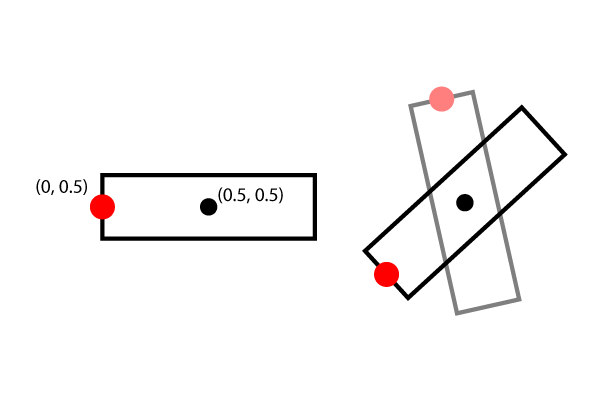
Any ideas ? Thanks.
There are a few different ways, but perhaps the most direct would be…
    auto v = Vec3(-.5f, 0, 0); // relocate so that 0,0 is the origin

    Mat4 m;
    Mat4::createRotationZ(angle, &m);

    auto result = m * v;
Note that the angle is in radians.
You could also use Vec2::rotateByAngle
    Vec2 oldPoint, center;
    Vec2 newPoint = oldPoint.rotateByAngle(center, angleInRadians);
2 Likes