Hi community,
So I have Particle Designer in my Mac, but I usually code most of the time in my Windows Machine which has much more power for all the stuff I am working on at the time, and all my computers at the office are Windows,
Since Particle Designer only runs in a Mac, when I code on Windows I either have to login in my Mac and work on certain particle effect or I have to use the tool located at: http://particle2dx.com/ which is great, but who knows how long it will survive online.
I always wanted a Particle Designer for Windows but options are very old and limited, so I decided to Code my own solution so I can have something I can create my particles effects native in Windows, and without having to worry if it would still exist online or not, plus it is helping me to practice my C++ skills  .
.
Anyway, once I finish it I was wondering if there would be any interest or need for it in the community? If there is any interest, I will create a link for it so you guys can give it a try and use it for your needs. It is still in a very early state, but it is fully functional already, I just have to make it a little prettier with some graphics I am working on already and I can release it most likely by the end of the week, and just add more features in the future.
Let me know, Tks.
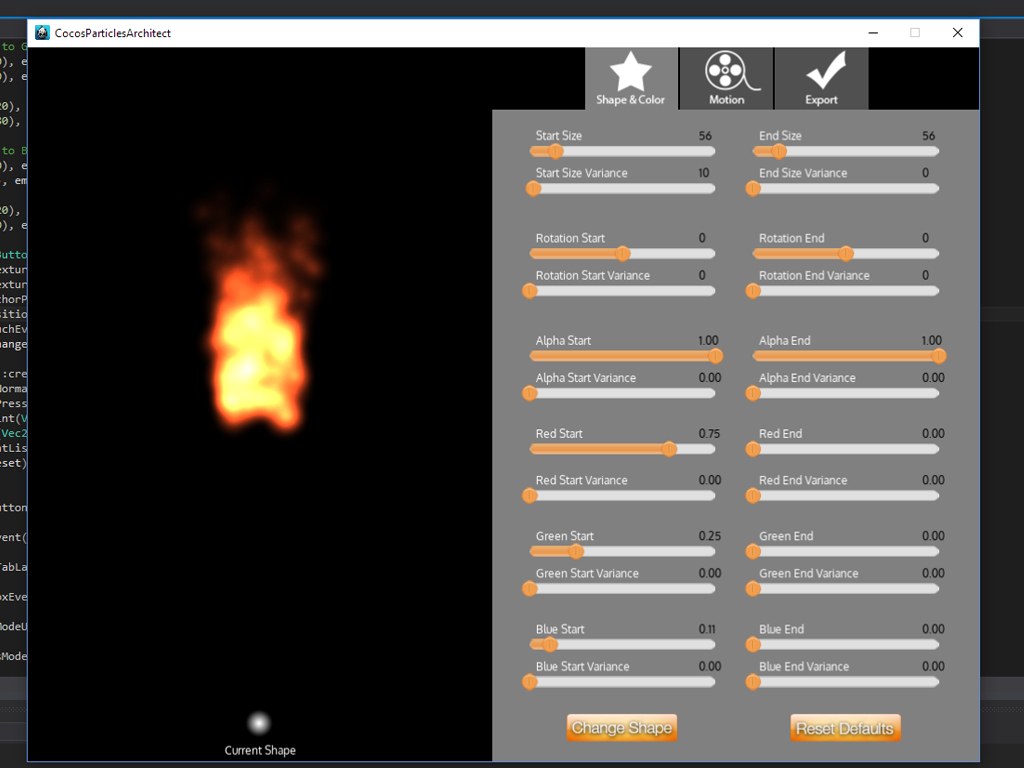
A couple shots of it, still not completed, still have to make it better looking, but it is getting there:
3 Likes
Thank you so much!
It’s great tool for Windows OS
A little update,
I had a liitle time to work on this tonight and I added a little more graphics to make it a bit more organized and I also added a few more options to have more control on the design, you can also now choose your own .png shape for your system. I also added multi-resolution support for 1080p, 2K and 4K monitors so the application re-sizes accordingly.
I am almost ready to release it, just have to finish up the Import / export screen and it should be ready to share with people interested in trying it out.
I’ll add more features in the future.
Hi @miguellara78,
This tool will be a great help, i’m really looking forward to it  . BTW, i’m trying to practice my C++ coding skill too, so can i ask you a few quesiton?
- Do you use cocos2d-x as a based for this editor? i asks, because i want to make an editor with cocos2d-x, just for learning purpose only, using cocostudio or cocos creator is still a better option.
- If yes, then do you update “The Particle” at runtime using Update() function?
- Is all variables static or just member variables (like duration, lifetime …)?
- Do you use CocosGUI.h for making UI or another Libs, right now i want to try out imgui, but i still wonder if i can use internal gui system or not?
- After editing, you save all the variables in some kind of structure, right?, and then when we need to load it, we need to parse that file? Do this approach apply to another editor (like level editor…)?
Sorry for my long post!
Have a nice day!
Hi nbtthief,
1,- I am developing it in C++ since I am more confortable with the cocos framework in C++ even thought I am more familiar with javascript, but I don’t see why you wouldn’t be able to code it in CocosCreator. A matter of prefference I think.
2.- I update the particle system in each Event raised by the UI controls, like in the slider I catch the ON_PERCENTAGE_CHANGE event and update tha particular system value. In some of the updates you have to Reset the System so changes update in the preview window.
3.- I don’t know if I get what you are asking here, but I update the emmiter’s properties directly from the UI control’s values.
4.- I am using cocos built-in UI, although you will need to use the OS’s own API’s when you want to interact with the OS, like I had to use the IFileOpenDialog interface so I could pick a new .png file from my computer and use it as a texture for the Particle’s System.
5.- Yes, basically you gather all the emmiter propertie’s and you create a stream with the right formating (.plist in this case), and the import of .plist is built in already in cocos2d-x so that one should be easy.
I am still a newbie when it comes to C++ and the Cocos2d-x Framework, but hopefully that answers some of your questions.
Hi,
Thanks for your answers. Of course, if i use in production, i will use cocos creatore or cocostudio. I’m newbie, too. I just want to hone my coding skills. Your reply will be good references for me. Thanks
No problem nbtthief,
Another Update,
I have implemented Import and Export screen and features.
Now you can import particles systems from other sources and you can now also Export your own particles systems from the app that you can use on your games or apps or whatever.
It is almost ready, I just need to wrap up a few details here and there.
3 Likes
Ok,
I think I am finished with the basic features, so if anyone wants to use it, feel free to download it, and hopefully it works on your side.
By the way, I am pretty fresh to C++ and the Cocos2d-x Framework overall so expect a few errors here and there  .
.
It is pretty basic, but It should be useful to architect some cool particle effects with real-time feedback.
Ok so a few of the features:
- Should work in Windows 8.1 to Windows 10 just fine.
- Create particle effects from scratch from the default particle system.
- Import your own .png files to use as source in your particle system.
- Import new particle systems from other sources. it supports particles consisting of a .plist and a .png image as well as .plist with embeded image.
- Export your particle system, it exports a .plist with embeded image. I tested compability with Cocos2d-x, Cocos2d-js and CocosSharp only. Hopefully it also works with other engines that support the .plist format but I am not sure.
And that is basically it, I will keep working in this tool to add more features in the future as well as try to keep squashing the bugs as they appear.
One of the features I am starting to work on soon are:
- Make it compatible with the Unity engine so you can import particles into Unity.
- Add support for multiple emmiters.
- Add a presets menu so you can recall favorite settings quick.
- Improve the UI and make it more user friendly.
No installation required, just download the Zip file, Unzip and open the “ParticlesArchitect.exe” file.
You can download it from:
Particles Architect Download Link
Anyway, hopefully it is of some use to some of you guys. Now I’ll get back to coding.
Hey @miguellara78
I am getting MSVCP140.dll missing error
I am running win 8.1
Hi @smitpatel88,
I think I found the issue, please download again and let me know if it works for you.
Tks for the feedback.
Thanks, but still same error.
Oh ok, I was trying to avoid have you installing this, but sounds like you are missing the “Microsoft Visual C++ 2015 Redistributable” in your PC.
Here is the download link, this should fix it.
https://go.microsoft.com/fwlink/?LinkId=615460
It has something to do with that only but still same error.
In my other laptop which is running win10 its working fine, it has VS 2015.
The link I gave you was for the X64, could you try installing the redistrbutable for X86?
https://www.microsoft.com/en-us/download/details.aspx?id=49984
Tks for checking out this for me, if it doesn’t work I’ll install a Virtual Machine with vanilla Wiindows 8, but hopefully the Microsoft Visual C++ 2015 Redistributable X86 does it.
I have been coding a little more, and now I have the application successfully running on Android as well, I just need to do some planning on how to design the import/export procedures, maybe saving and picking up the file from the local storage… or dropbox … or…
So I might share an IOS and Android ports of the app once I have it running decently.
Screenshot from my Android phone:
Yeah, now its working. 
Thanks.


 . BTW, i’m trying to practice my C++ coding skill too, so can i ask you a few quesiton?
 .
.