Long time lurker but i just made an account so i can seek help in the forums.
I like how things are going with the 3D development of the framework and i need to say i’m quite excited. Keep up the good work!
So my problem. I want to achieve texture mipmapping for a sprite3D “plane” as a background i’m trying to display.
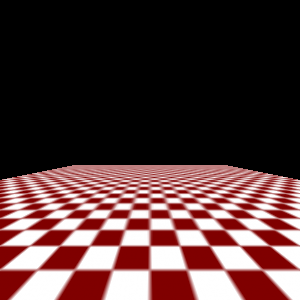
What i’m trying to achieve is actually this:
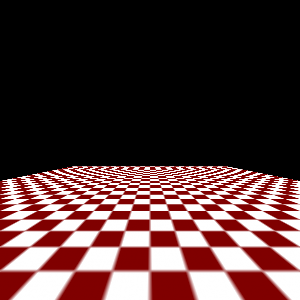
Instead of this:
Those pictures represent my problem quite well.
I’m looking for guidance on how to tackle this problem under the cocos2d framework.
I’ve stumbled upon something like this but i was not sure if sprited3D can be used like this.
It has the setTexture method, which takes an object of Texture2D. But is that changing anything?
I’ll also give it a try.
Okay, basically this is what i tried and i see no difference at all. I also experimented with textParams a little bit but still no difference. Maybe i’m doing something wrong?
Quick update:
The above code actually works. And produces the desirable effect. Need to do some more research because it only worked after changing my image to something different.
I’ve made sure i am using POT textures.
Everything seems to be working great now. Your suggestion worked as expected. The issue i am facing now is that if i load up the same texture my .obj model has and try to replace them with mipmaps generated nothing changes.
If i simply copy & rename the same image (ex: cube_text.png -> cube_text2.png) and try to load it up and replace the sprite3d texture with it, everything is working great.
Try doing it after you load your model. It’s a shame you can’t iterate over all meshes in sprite3d. Or perhaps you could try extending your local version of it’s implementation to expose the meshes. That way you can load the model, iterate over all of it’s textures and generate mipmaps for them.
but if I create another Sprite3D from the same file, the textures of the already created sprite3D become non-mipmaped. It seems that when you create the Sprite3D the texture parameters are set to a default again? I’m reporting this because I’m not sure if it is a bug or the defult behaivor, or if I’m doing something wrong by creating multiple Sprite3Ds from the same file. Thanks!
I’m also facing this issue. Stepping through the code and it looks like the mip maps are already in the PVR texture but when it loads up I get horrible texture aliasing.