Does RichText support multiple line of text?

Hi,

I’m pretty new to cocos2d-x. Just started today. My project have a need to display texts mixed of fonts and colors in multiple line. I find RichText might fit my needs (and that’s one of the reason I made a switch to Cocos2d-x).

I tried to create RichText using the follwing codes:-

auto text = cocos2d::ui::RichText::create();
const auto font = std::string("fonts/CSPrakas.otf");

text->pushBackElement(ui::RichElementText::create(0, Color3B::BLUE, 0xFF, "When I was young, ", font, 32));
text->pushBackElement(ui::RichElementText::create(0, Color3B::GREEN, 0xFF, "I listened to the radio.\nWaiting for my favorite song ", font, 32));

I expected to have something like (color omitted)

When I was young, I listened to the radio
Waiting for my favorite song

Instead I’ve got
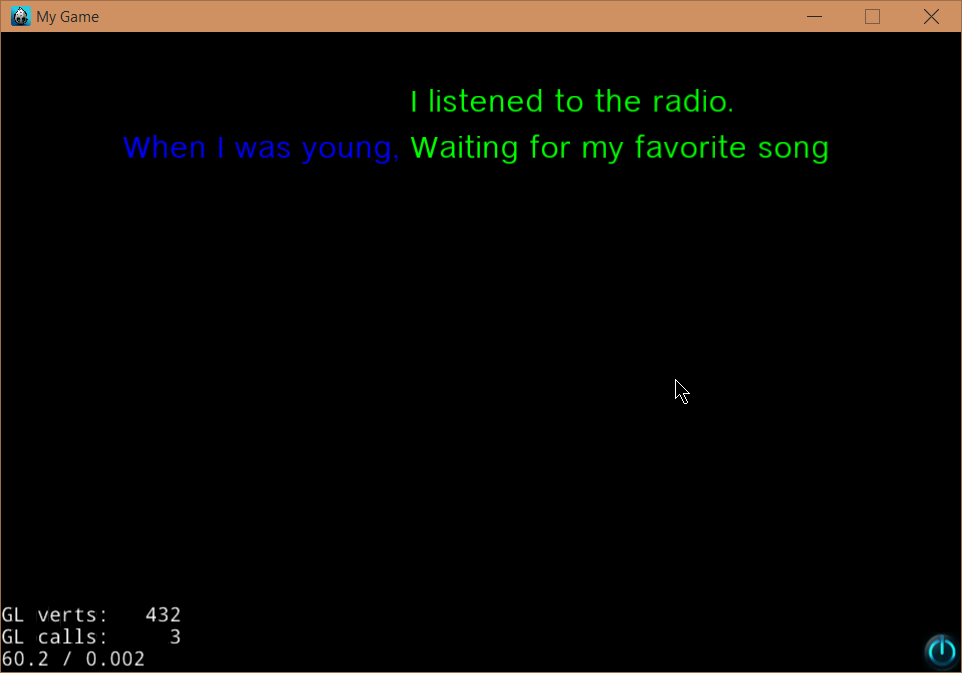
Looking through the code, it looks like each RichTextElement has its own Label object (as a renderer). RichText is kinda like a collection of Label objects. So when one of them contains line break, the line is broken within the Label object instead of the whole RichText object.

Anyway, is RichText supposed to support multiple lines of text ? Or should I just use multiple RichText objects instead ? I’d just want to ask if it’s design decision or not. If it’s really a bug I’ll report in so someone (or even myself) might fix it. Or maybe there is something else I should use instead of RichText class.

If multi-line is supposed to be supported, I think the proper fix would be to break RichTextElementText further into multiple Label object at the line break character (like \n), then position it accordingly. But then it needs to be determine where the base line of the next line would be (in the case when multiple fonts/font sizes are in used in the RicthText object). I don’t see the baseline value get exposed from Label class anyway.

This class seems to be complicated to implement properly :smile:

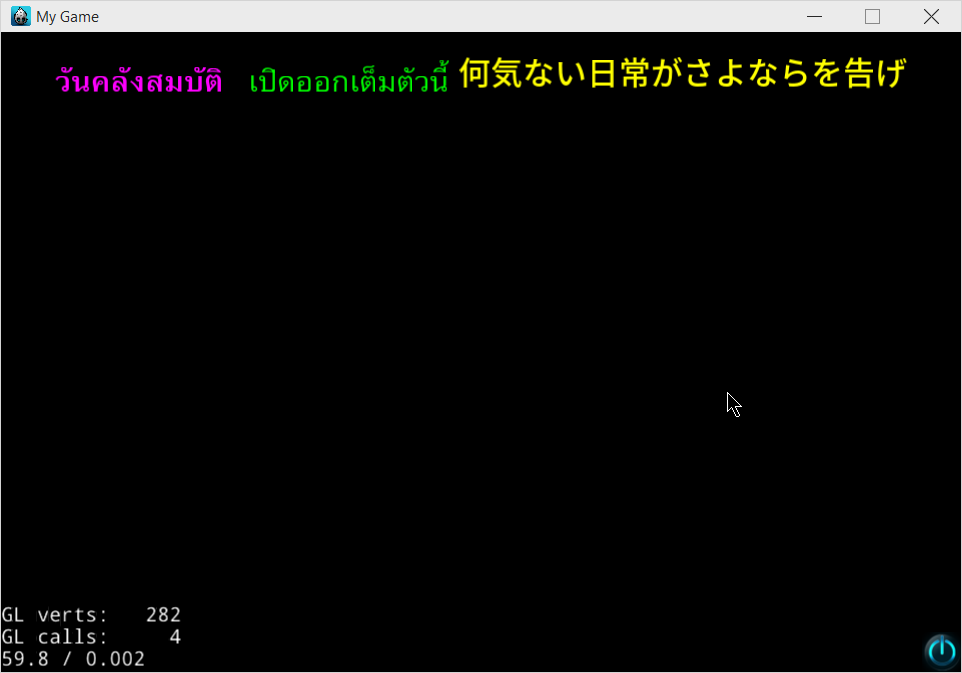
PS. I’ve also found that when using multiple fonts in RichText, the baseline is not aligned. That might because currently there’s no way to know where the baseline of each Label objects are. (sorry for non-English text in the screenshot. I’m testing multiple languages text right now).
RichText should support multiple lines of text and you shouldn’t use multiple RichText objects.

And the line break also be handled by RichText itself, so you don’t need to add extra line break to each RichTextElement.

You could take a look at the examples in the cpp-test.

1 Like

I see that it actually supports line breaks when the content size is set.

But still it doesn’t handle newline (\n) well, do it ? Or I should use something else to manually break the line. (the screenshot below I put \n after the word ‘TTF’, notice how the green text is handled.).

I see your issue. I also wanted to use RichText, but it doesn’t have any line break/wrapping options that I know of, so it currently breaks the words up also, you can see the orange “Have” is on two lines. Being a collection of Labels, it sounds like RichText is more of a hack than a solution.

You could make every single letter a separate element and manually line break? :smirk_cat:

I think making every single letter a separate element doesn’t sound right to me. In fact it might even cause problem (especially with alignments). I haven’t tried it by the way.

Anyway I created a new RichElement class, called RichElementNewLine. Simply put it adds a new line at the position it is.

The RichText::formatText() is modified a little bit to support the added RichElement::Type value (Type::NEWLINE) as below.

case RichElement::Type::NEWLINE:    
{
    addNewLine();
    break;     
}

Easy, isn’t it ? Notice the green text starts at the next line instead of right after the Japanese text.

This works for me.

Well line breaking is actually complicated. In English it can be breaks at any white space as usually words in English are separated by spaces. In some other language like Japanese or Chinese (please correct me if I’m mistaken), words are not separated by the spaces, but it is quite acceptable to be break any where between charactors.

For us Thai, this is much more complicated. Words are not separated by spaces (sentences are), and if you randomly breaks the line you might accidentally breaking in-between word, and end up having display error.

For example

เราสู้ไม่ถอยจนก้าวเดียว

litterally means “We fight without retreat even one step”.

This is 7 words sentences. like :

เรา สู้ ไม่ ถอย จน ก้าว เดียว

If you somehow breaks the line like :


ราสู้ไม่ถอยจนก้าวเดียว

The meaning changes to “The fungus will not retreat.” …

And in the worst case …

เราส
ู้ไม่ถอยจนก้าวเดียว

I think this does not need further explanation :slight_smile:

Everyone I know that working for games with Thai localization just skipped the auto line break entirely and relies on manual break. That’s why manual break is very important to us. Anyway to implement the proper line break the best option would be to use i18n library like ICU (or l10n library like libthai if we are targetting specific language).

I hope you find our language interesting :slight_smile: I don’t really know how many Thai are using cocos2d-x, so this might not be really important (and given the engine is already open source, we can work on it somehow if we need to :smiley: )

Opps I think I’m talking too much. Sorry about that!

1 Like

Yes, the \n is not handled properly. This should consider to be a bug here.

Hi, @mr_tawan
Thanks for your explanation. Since I have no idea about Thai language, I want to confirm one thing, does cocos2d::Label class handle Thai language line break properly?

Thanks.

With manual \n breaks, everything looks good. No overlapping between lines.

With setDimension(), the line is breaks at spaces. Since Thai text does not have each words separated at spaces, the output might looks a little bit weird, as each line can be very short.

With setLineBreakWithoutSpace() set to true, Some words are broken right in the middle. I couldn’t reproduce the case which a word is broken between characters at different level (says … สู้ is 3 characters, , and , all 3 are different in the vertical placement (one on the baseline, one underneat it, and another over the baseline character). If the line is break after then it would be pretty bad). Let’s just say there’s no issue until I can reproduce the case :slight_smile: .

There is no need to change the RichText implementation.

Just create and add a new line separator node:

Node *newLine = Node::create();
newLine->setContentSize(Size(richText->getContentSize().width, 0.0f));
richText->pushBackElement(ui::RichElementCustomNode::create(0, Color3B::WHITE, 255, newLine));

By setting a content height of >0, you can even space out the new line in the vertical direction.
It does not matter, which color or if the opacity is full or none.

Just don’t forget to create new “new line node” every time you are adding one, as it has to be a clone/new object. You could easily implement that with a factory macro.

Anyone already have a parser for a (subset) Markdown/HTML to RichTextElement(s)

I’m also looking for this!

Does anyone know of a “command console” widget like the command console in various games?
What I need is a scrollable rich text widget.
I tried do put a RichText widget in a ScrollView, but unfortunately I cannot change the anchor of the inner container and it results in weird position/offsets.

Edit: I found a solution by doing contentSize magic. The anchor point of a scroll view is BOTTOM LEFT and the rich text container’s one is MIDDLE.

Just solved (at least partially) this bug by changing the UIRichText.js (not sure if it would work on CPP, will try later when using JSB :P.

if(text.indexOf("\n") > -1) { //String contains \n
            var leftLength = text.indexOf("\n")+2;
            var leftWords = text.substr(0, leftLength -2);
            var cutWords = text.substr(leftLength, text.length - 1);

            this._handleTextRenderer(leftWords.substr(0, leftLength), fontNameOrFontDef, fontSize, color);

            this._addNewLine();
            this._handleTextRenderer(cutWords, fontNameOrFontDef, fontSize, color);
            return;
        }