How to make DirectionLight works?

Prerequisite ------------------------------------------
OS : OSX Yosemite (latest)
Compiler : XCode (latest)
Cocos2d-x version : 2.7.1
3D Editor : Blender 2.75

resource files: errorcase.zip (10.7 KB)
( contains : actor_02_branch_01_armor.png, actor_02_branch_01.c3b )

Hi, geeks!

I face some serious error to draw mirrored box.
I was expected everything works well so make 3d sprite and rotate it.
But. next code causes run time logic error.

void AnonymousScene::init(){

[…]

std::string path1 = “actor_02_branch_01.c3b”;
auto somesprite = Sprite3D::create(path1); //
somesprite->setScale(0.5f);
somesprite->setRotation3D(Vec3(0, 0, 0));
somesprite->setPosition3D(Vec3(200, 100, 10));
addChild(somesprite);

auto rotation = RotateBy::create(3, Vec3(0, 360, 0));
somesprite->runAction(RepeatForever::create(rotation));
}

Cocos2d-x omites faces arbitrarily.
?? Am I missed something ??

Help me Geeks

It seems cocos2d-x logic error.

In a mesh object, A Face has 2 side, but Cocos2d-x draws just one side.

So, face dosen’t show in some degrees.

Here is more serious version.

At this time, I weave planes to box and wing in blender.

errorcase2.zip (17.0 KB)

I made some example

It was coded for cocos2d-x 3.8.1.

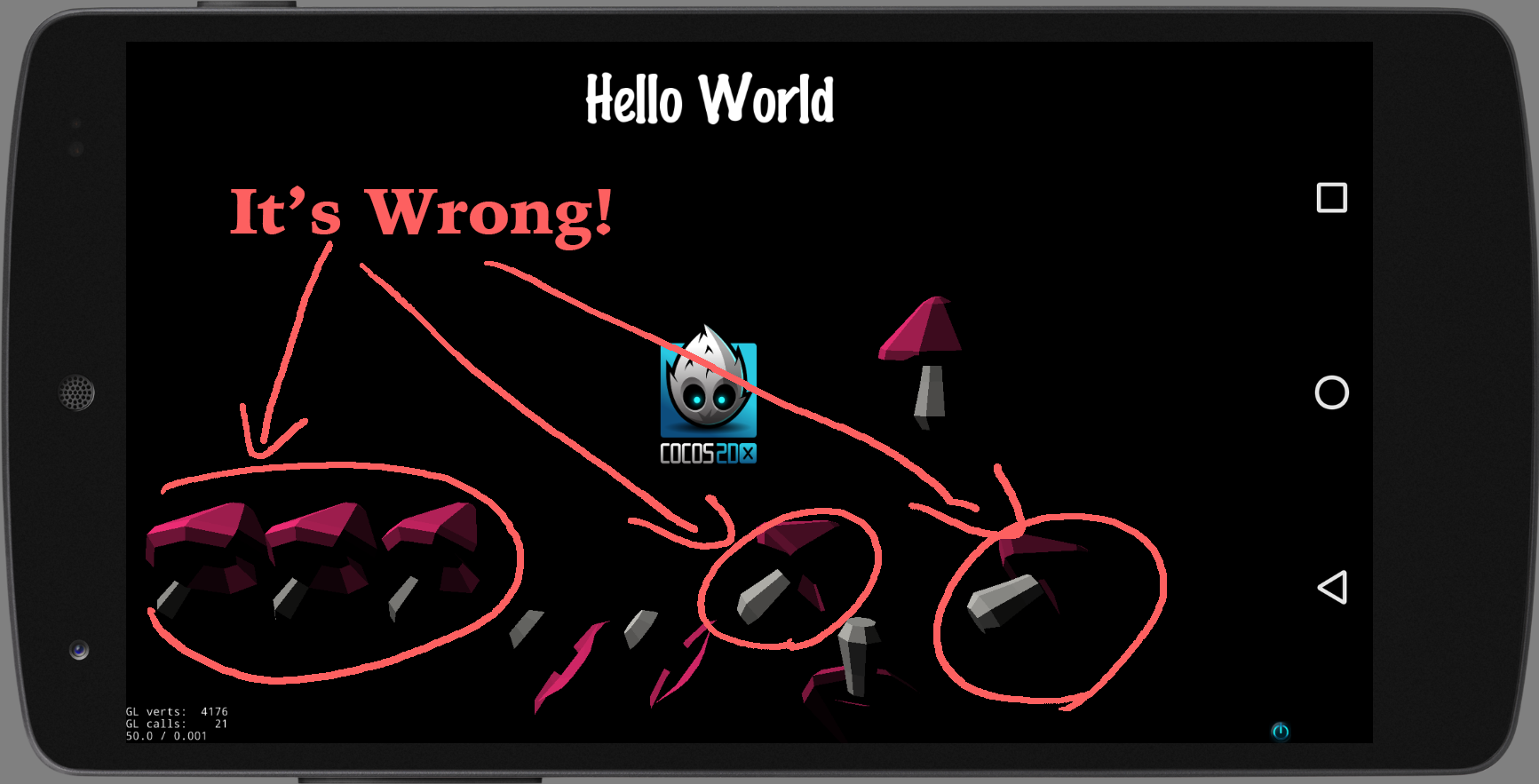
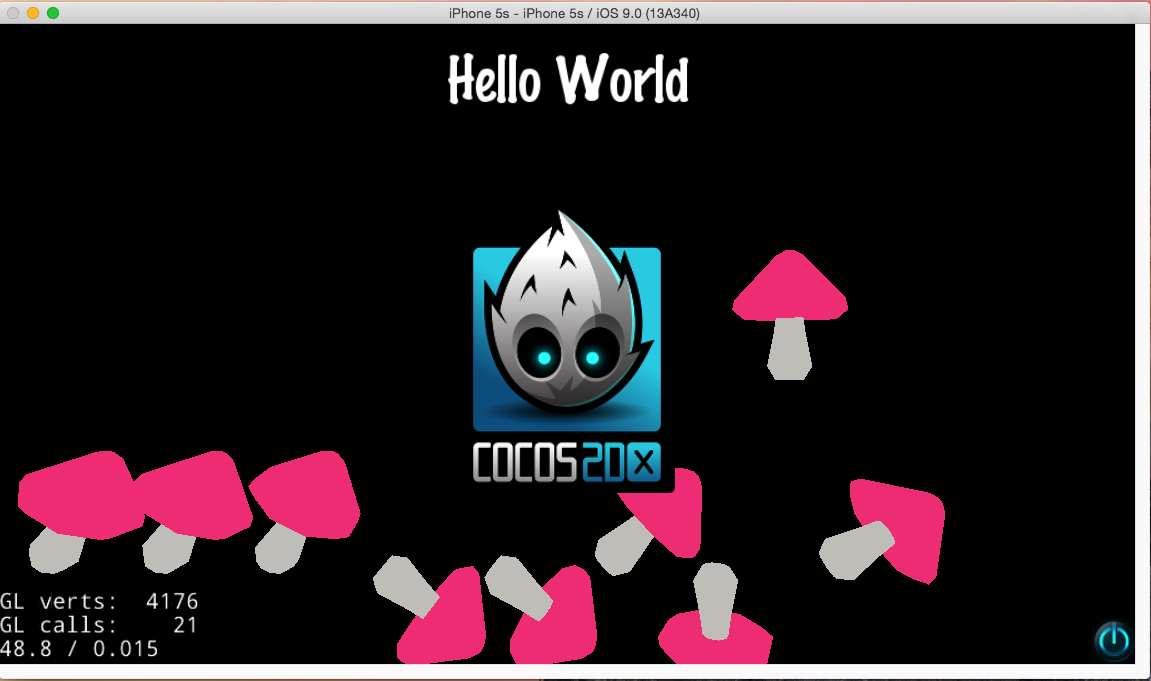
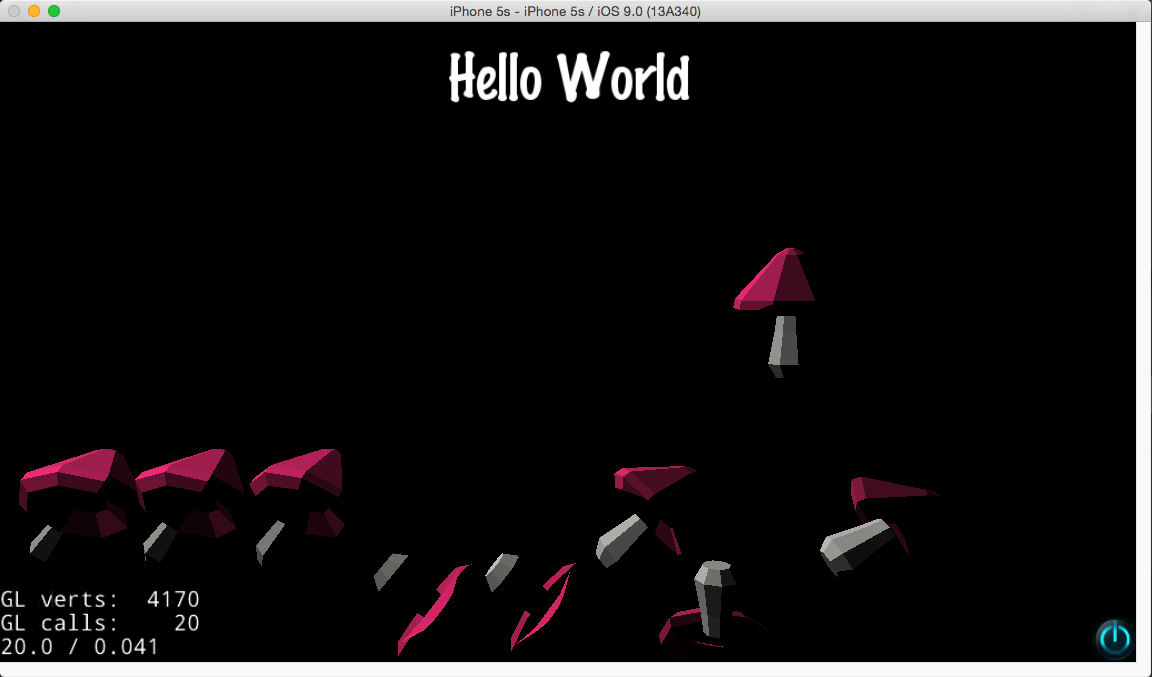
it has another problems…

in ios

in android

I just create project and add next code

void HelloWorld::postInit(){
std::string c3b = “mushroom_001_branch_01.c3b”;
float scale = 1.0;

Color3B lightcolor = Color3B(255,255,255);
auto light = DirectionLight::create(Vec3(1, -1, 0), lightcolor);
addChild (light);

light = DirectionLight::create(Vec3(1, 1, 0), lightcolor);
addChild (light);

auto item = Sprite3D::create(c3b); //
item->setScale(scale);
item->setRotation3D(Vec3(0, 0, 0));
item->setPosition3D(Vec3(300, 150, 100));
//item->setCameraMask(CameraFlag::USER1);
addChild(item);

item = Sprite3D::create(c3b); //
item->setScale(scale);
item->setRotation3D(Vec3(0, 20, 30));
item->setPosition3D(Vec3(100, 100, 100));
//item->setCameraMask(CameraFlag::USER1);
addChild(item);

item = Sprite3D::create(c3b); //
item->setScale(scale);
item->setRotation3D(Vec3(0, 20, 30));
item->setPosition3D(Vec3(130, 100, 100));
//item->setCameraMask(CameraFlag::USER1);
addChild(item);

item = Sprite3D::create(c3b); //
item->setScale(scale);
item->setRotation3D(Vec3(0, 120, 30));
item->setPosition3D(Vec3(160, 100, 100));
//item->setCameraMask(CameraFlag::USER1);
addChild(item);

item = Sprite3D::create(c3b); //
item->setScale(scale);
item->setRotation3D(Vec3(0, 40, 130));
item->setPosition3D(Vec3(190, 100, 100));
//item->setCameraMask(CameraFlag::USER1);
addChild(item);

item = Sprite3D::create(c3b); //
item->setScale(scale);
item->setRotation3D(Vec3(0, 140, 130));
item->setPosition3D(Vec3(220, 100, 100));
//item->setCameraMask(CameraFlag::USER1);
addChild(item);

item = Sprite3D::create(c3b); //
item->setScale(scale);
item->setRotation3D(Vec3(0, 0, 45));
item->setPosition3D(Vec3(250, 100, 100));
//item->setCameraMask(CameraFlag::USER1);
addChild(item);

item = Sprite3D::create(c3b); //
item->setScale(scale);
item->setRotation3D(Vec3(0, 45, 180));
item->setPosition3D(Vec3(280, 100, 100));
//item->setCameraMask(CameraFlag::USER1);
addChild(item);

item = Sprite3D::create(c3b); //
item->setScale(scale);
item->setRotation3D(Vec3(0, 60, 60));
item->setPosition3D(Vec3(310, 100, 100));
//item->setCameraMask(CameraFlag::USER1);
addChild(item);
}

What’s wrong with it?

src.zip (507.1 KB)
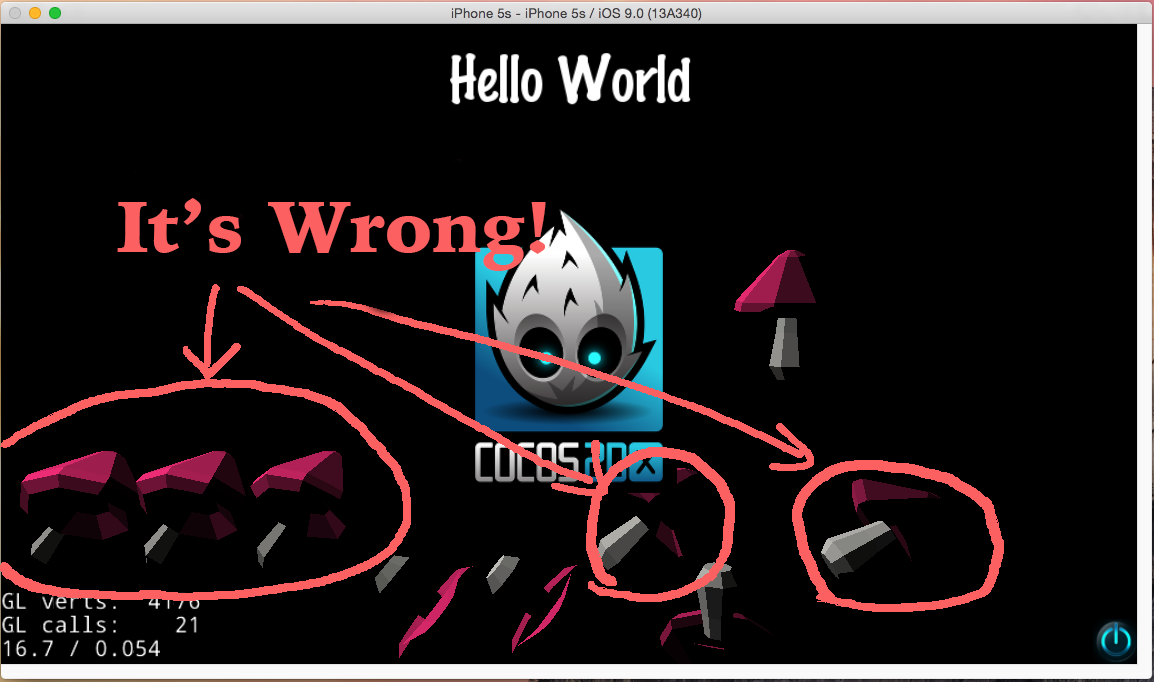
I think the error came from DirectionLight

If comment next codes, cocos2d-x shows whole mushroom finally.

Color3B lightcolor = Color3B(255,255,255);
auto light = DirectionLight::create(Vec3(1, -1, 0), lightcolor);
addChild (light);

light = DirectionLight::create(Vec3(1, 1, 0), lightcolor);
addChild (light);

But, without lights the images are flat.

How can I do that…

(No one replies…)

@brightwing

1.Cocos2d-x draw the front face by default. You can also draw both sides. sprite3d->setCullFaceEnabled(false);

2.Cocos2d-x use unlit shader when there is no lights in the scene. And it switch to light shaders when adding lights to the scene. The images are flat when there is no lights. It is correct.
You can have your artist modify the texture to make it looks better.

3.Another question. Do you mean that you add two lights and only one light take effect in your game?
The number of lights is configurable in Cocos2d-x. You can modify _maxDirLightInShader, _maxPointLightInShader, _maxSpotLightInShader in class of Configuration. You can also modify .conf file if you load those parameters in .conf file.

Dear @super626

1

Cocos2d-x draw the front face by default. You can also draw both sides. sprite3d->setCullFaceEnabled(false);

Cool stuff. But, I guess It has to be describe in the document essentially.
Even if it’s were basic stuff to skilled, that’s why it must be noticed for beginer.

And, I’ve learn it today.

2

Cocos2d-x use unlit shader when there is no lights in the scene. And it switch to light shaders when adding lights to the scene. The images are flat when there is no lights. It is correct.

Ok, I under stand what makes images flat.
Although, you explained the shader of cocos2d-x on detail, some question is remained still.

Next mushroom image using DirectionLight and setCullFaceEnabled(false) is still wrong.

It cannot be recognized for mushroom.

It just looks like detached part of branch and head.

You can have your artist modify the texture to make it looks better.

As time goes by, It’s been applied naturally.

3

Do you mean that you add two lights and only one light take effect in your game?

As you can see the source codes. there is two lights.
And, I didn’t mentioned that “Only one light take effect”.

The number of light has no difference between one from more, except brightness.

The number of lights is configurable in Cocos2d-x. You can modify _maxDirLightInShader, _maxPointLightInShader, _maxSpotLightInShader in class of Configuration. You can also modify .conf file if you load those parameters in .conf file.

Thanks, about that imformation I didn’t knew that.
I’ll be on test.

Thank you.

cocos2d-x version 3.8.1 not working also

Hi @brightwing
About question 2.
The mushroom looks like detached part of branch and head. Because only one directional light is used. You can add another ambient light.

auto ambient = AmbientLight::create(Color3B(100,100,100));
addChild(ambient);

auto light = DirectionLight::create(Vec3(1, -1, 0), Color3B(128, 128, 128));
addChild (light);

Hi @brightwing
About question 2.
The mushroom looks like detached part of branch and head. Because only one directional light is used. You can add another ambient light.

auto ambient = AmbientLight::create(Color3B(100,100,100));
addChild(ambient);

auto light = DirectionLight::create(Vec3(1, -1, 0), Color3B(128, 128, 128));
addChild (light);

Hi @super626

Above codes are applied.

I can sense more bright mushrooms but I think it looks still detached…

:sweat_smile:

The color on the mushrooms is not smooth enough. I guess there is something wrong on the normal of your mashrooms. You can have a artist help you check the normal. Each vertex should have only one normal.