Hi there,
I’m using cocos2d 3.17 with Xcode 11. I’m doing a porting of a iOS app to a Mac app but the shader doesn’t work. The app gives me this error
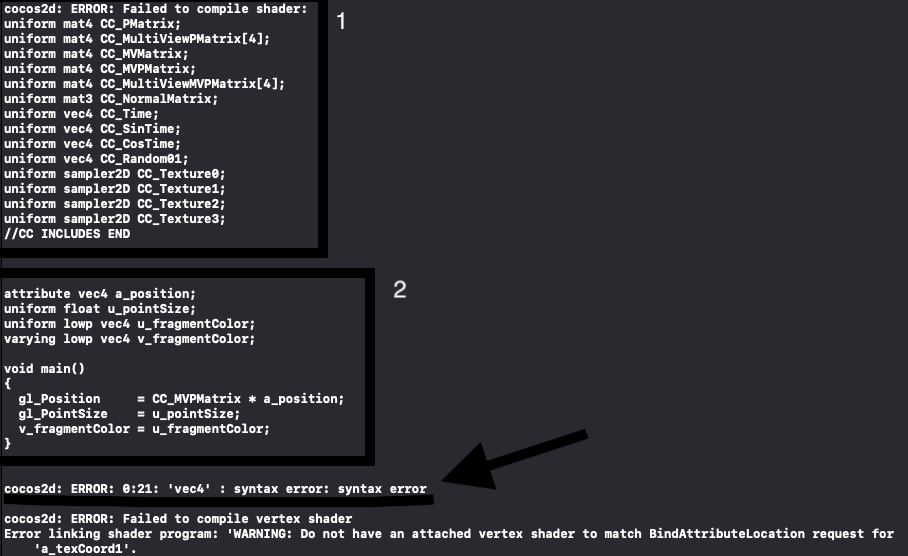
1_ I think this is caused by this line in CCGLProgram, because the compileTimeHeaders it’s actually empty and it remain empty, for this the compiler cannot initialize the shaders and gives us the first error. I don’t understand: how can I compile shaders if they are not initialized?
bool GLProgram::compileShader(GLuint * shader, GLenum type, const GLchar* source, const std::string& compileTimeHeaders, const std::string& convertedDefines)
{ …
…
std::string headersDef;
if (compileTimeHeaders.empty()) {
#if CC_TARGET_PLATFORM == CC_PLATFORM_WINRT
headersDef = (type == GL_VERTEX_SHADER ? “precision mediump float;\n precision mediump int;\n” : “precision mediump float;\n precision mediump int;\n”);
// Bugfix to make shader variables types constant to be understood by the current Android Virtual Devices or Emulators. This will also eliminate the 0x501 and 0x502 OpenGL Errors during emulation.
// Changed shader data types mediump to highp to remove possible sprite joggling on some Android phones.
#elif CC_TARGET_PLATFORM == CC_PLATFORM_ANDROID
headersDef = “#version 100\n precision highp float;\n precision highp int;\n”;
#elif (CC_TARGET_PLATFORM != CC_PLATFORM_WIN32 && CC_TARGET_PLATFORM != CC_PLATFORM_LINUX && CC_TARGET_PLATFORM != CC_PLATFORM_MAC)
headersDef = (type == GL_VERTEX_SHADER ? “precision highp float;\n precision highp int;\n” : “precision mediump float;\n precision mediump int;\n”);
#endif
}else{
headersDef = compileTimeHeaders;
}
const GLchar *sources[] = {
    headersDef.c_str(),
    COCOS2D_SHADER_UNIFORMS,
    convertedDefines.c_str(),
    source};
2_ The second one is my actual custom shader that fails with the error signed by the arrow. When I play it on iOS it works, but if I use the same code for the Mac app, it gives me this trouble.
Thank you if someone will help me and sorry for my English.
Bye