Hello, I’ve check multiple forums, and I’ve found some people who have had this same problem, (“python” not found in PATH | eclipse error) however, they all say that they simply had to add Python to the build environment. I tried that, and it’s still not working.
Basically, I keep having an error appear in eclipse when I import a cocos 2d-x project. the error reads “Program “python” is not found in PATH” You can see it at the bottom of the image in this post.
I’ve also tried restarting eclipse, and still nothing. I’m currently compiling with android API 19: Kit Kat, and I’ve tried with Cocos 3.0, and 3.2rc0.
http://imgur.com/H8GajaI
Any suggestions?
hi… 
have you defined the path of python on the system environment variable… ??
in the path variable of your environment variables… ??
do it in there, if you haven’t
and if you made any changes in the environment windows here in the screenshot… undo it.
because i have only PWD and CWD in my environment in there…
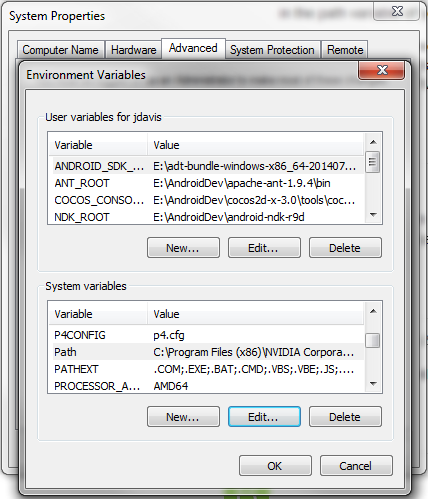
This is what my System environment variables look like: http://imgur.com/cr6OqMJ. I believe that it is pointing to the right location.
show us that same window, but outlining your PATH variable. @pabitrapadhy has the right idea.
Sorry, I’m new to Eclipse. Could you tell me where to find my PATH variable?
EDIT: I think this is what you’re looking for. I added the path to system variable “.py” but nothing fixed the problem, even after restarting Eclipse. http://imgur.com/cpz8pvk
Scroll down farther in that same box and you should see one that says PATH
My Path Variable reads:
C:\Program Files (x86)\NVIDIA Corporation\PhysX\Common;C:\Perl\bin;C:\Program Files (x86)\Intel\iCLS Client;C:\Program Files\Intel\iCLS Client;%SystemRoot%\system32;%SystemRoot%;%SystemRoot%\System32\Wbem;%SYSTEMROOT%\System32\WindowsPowerShell\v1.0;C:\Program Files\Intel\Intel(R) Management Engine Components\DAL;C:\Program Files\Intel\Intel(R) Management Engine Components\IPT;C:\Program Files (x86)\Intel\Intel(R) Management Engine Components\DAL;C:\Program Files (x86)\Intel\Intel(R) Management Engine Components\IPT;%TTPRO_APPDIR%;C:\JPSoft\TCCLE;C:\Program Files\Perforce;C:\Program Files (x86)\Perforce
should I add “;C:\Python27\python.exe”?
YES!! You guys are awesome! I’ve been trying to get this to work for about 10 hours, and you guys fixed it! Thank you!
1 Like
It’s our pleasure @Banshee01930
gud luck with the programming
happy coding. 

