[SOLVED] Ndk-gdb Cannot access memory at address issue

Hello,

I’m trying to debug my application on android emulator but while trying setup a breakpoint I’m getting:
Cannot access memory at address 0x227142

How I’m compiling and starting gdb:

My Application.mk file:
APP_STL := gnustl_static

APP_CPPFLAGS := -frtti -DCC_ENABLE_CHIPMUNK_INTEGRATION=1 -std=c++11 -fsigned-char                            
APP_LDFLAGS := -latomic                                                                                       
                                                                                                              
                                                                                                              
ifeq ($(NDK_DEBUG),1)                                                                                         
  APP_CPPFLAGS += -DCOCOS2D_DEBUG=1                                                                           
  APP_OPTIM := debug                                                                                          
else                                                                                                          
  APP_CPPFLAGS += -DNDEBUG                                                                                    
  APP_OPTIM := release                                                                                        
endif                                                                                                         
                                                                                                              
APP_ABI := armeabi armeabi-v7a                                                                                
NDK_TOOLCHAIN_VERSION := clang                                                                                
APP_STL:=c++_static                                                                                           
APP_CPPFLAGS += -std=c++1y                                                                                    
NDK_TOOLCHAIN_VERSION=4.9                                                                                     
APP_OPTIM := debug

I’m compiling application with command:
cocos run --target android-10 --ap android-10 --ndk-mode debug --ndk-toolchain arm-linux-androideabi-4.9 --platform android --app-abi armeabi

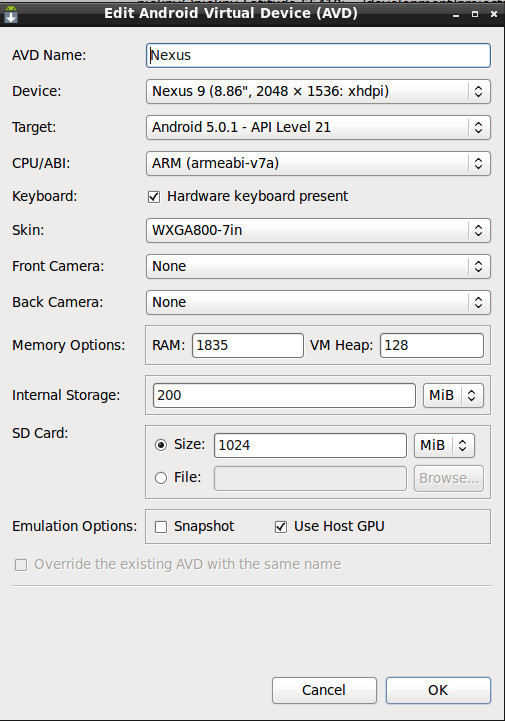
  1. Emulator spec:

  2. After starting emulator and starting application on it I’m running:
    - ndk-gdb
  • I’ve realised that there were waring:
    warning: Could not load shared library symbols for 104 libraries, e.g. libstdc++.so

  • I figured out that there were no symbols related to my app and cocos loaded to gdb! → Is it correct?

  • I’ve loaded symbols by:
    file ./obj/local/armeabi/libcocos2dcpp.so

After that I’ve found symbols from my App by:
file types Checker

-I’ve tried to setup breakpoint by:

b CheckersTableScene.cpp:599 and it leads to:
Cannot access memory at address 0x227142

What I’m doing wrong?:slight_smile:

As a rule of thumb, you’re doing wrong by using an emulator in the first place.
I’ve tried debugging with ndk-gdb for a week with a real device, and i’ve given up out of sheer pain. But that was adt times. Now there’s android studio. There should be a thread somewhere about debuggin with it.

Thanks for your opinion but I think that emulator is more convinient than real device. I also want to test my app on different screen sizes, diffrent android version etc. and I don’t have so many devices.

What is more I have also problems with debugging on real device:) so first I would like to have setup for emulator. I also don’t want to use Android Studio since I have my favourite IDE:) (as far as I know Android studio is an IDE) and debugging should be possible without any IDE. So I’m waiting for any suggestions. If I will find solution I will also put it here.

Maybe this is the root cause:

After loading shared library:
by
file ./obj/local/armeabi/libcocos2dcpp.so

there is still:
No libcocos2dcpp.so

when I’m checking libraries by:
info sharedlibrary

Any suggestions?

Looks like set solib-search-path obj/local/armeabi helped me a lot. So after this command I have finaly libcocos2dcpp.so set to YES !:slight_smile: and looks like debuging works correctly!